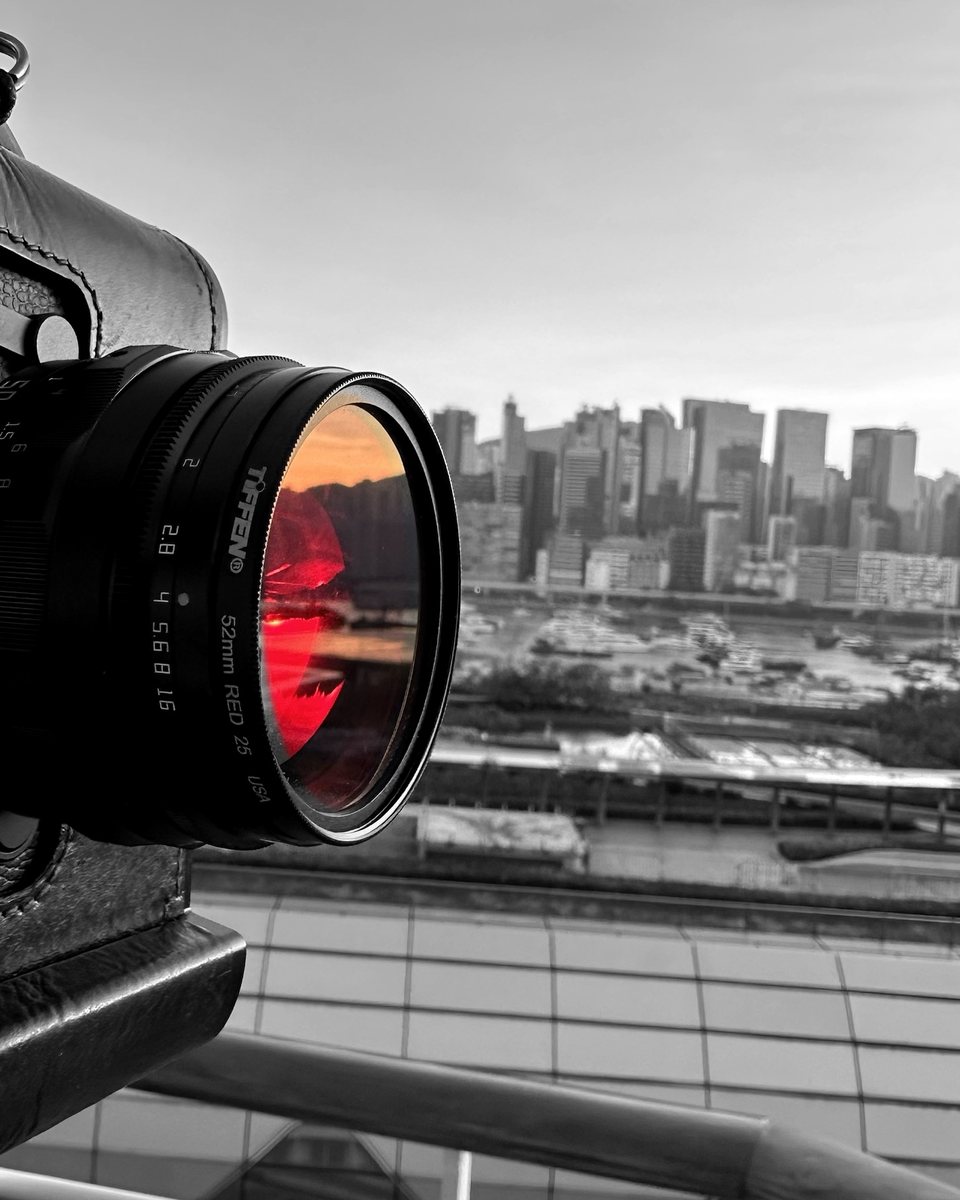
Quick answer: Before you buy a Leica Monochrom, put a Red 25 filter on the camera you already own, set it to black and white, and shoot that way for two weeks. If you find yourself hunting for clouds and red brick, the Monochrom will feel like home.
Why a Monochrom needs colour filters
A normal sensor sits under a Bayer filter: a mosaic of red, green and blue dyes, half of them green. Each pixel sees one colour, and software rebuilds the rest. That is also why you can turn a colour file into black and white later and choose how each colour converts.
A Monochrom has no colour filter at all. Every pixel records brightness across the whole visible spectrum, which makes it sharper per pixel and roughly a stop more sensitive. The catch: a red flower and a green leaf that reflect the same amount of light come out the same grey, and nothing in editing can pull them apart.
So on a Monochrom, colours are separated before the light reaches the sensor, with a filter on the lens. Black-and-white film worked exactly this way for a century.
The optics of a red filter
A Red 25 passes red light, roughly from 600 nm up, and absorbs most blue and green. The rule that follows: a colour filter lightens its own colour and darkens its opposite. Red things go light; blue and green things go dark.
- The sky goes dark. Blue sky is sunlight scattered by air molecules (Rayleigh scattering), which is strongest at short wavelengths: proportional to 1/λ4. Blue at 450 nm scatters about six times more than red at 700 nm. Block the blue and the sky has little light left to give.
- Clouds stay white. Cloud droplets are much larger than a wavelength and scatter every colour about equally (Mie scattering). Dark sky, bright cloud: that is the drama.
- Distance gets clearer. Haze is mostly scattered blue light, so cutting it brings far hills and skylines forward.
- Shadows deepen. On a sunny day, shadows are lit by blue skylight, so the filter darkens them and sunlit scenes gain contrast.
- Skin lightens and smooths. Red blemishes fade, lips go pale and blue eyes darken. Flattering for some faces, ghostly for others.
- Foliage darkens, because leaves are green. Go further, to a 720 nm infrared filter, and leaves flip to glowing white: see the infrared lesson.
The two-week test
- Screw a Red 25 onto the lens you use most.
- Set the camera’s picture profile to monochrome so the screen shows black and white. Shoot RAW as a safety net.
- Leave it on for two weeks. No taking it off for “just one colour shot”.
- At the end, ask one question: did I miss colour, or did I stop seeing it?
On a rangefinder, the optical finder doesn’t look through the lens, so it still shows colour and you have to picture the result. That is good training for a Monochrom. An EVF or live view shows the filtered image if you want it. On film, a roll of black-and-white film behind a Red 25 is the original version of this test.
Exposure and focus
- Three stops. A Red 25 costs about three stops in daylight: 1/1000 s becomes about 1/125 s. Through-the-lens metering handles it; check the histogram.
- Focus. Red light focuses very slightly behind blue (chromatic aberration). With a Red 25 at normal apertures you won’t see it; with deep red or infrared filters it matters.
- With an ND. Stack a Red 25 and an ND for dark skies and long exposures together; watch for vignetting on wide lenses. See long exposure, step by step.
The black-and-white filter family
| Filter | Effect in black and white | Light lost |
|---|---|---|
| Yellow 8 | Gentle sky darkening; the old film default | 1 stop |
| Green 11 | Lighter foliage, darker skin tones | 2 stops |
| Orange 21 | Stronger sky, still natural skin | 2 stops |
| Red 25 | Dramatic sky, haze cut, smooth skin | 3 stops |
| Red 29 | Near-black sky, a step toward the infrared look | 4 stops |
Typical daylight values; check each filter’s own specification.
Share your red filter photos: #TwoWeeksInRed
Doing the two-week test? I’d love to see it. Use the hashtag #TwoWeeksInRed so other readers can find your work, and I’ll feature my favourites on the Subscribers Photo Wall and in my stories.
- On Instagram, TikTok or YouTube: post your red filter frame with #TwoWeeksInRed and tag @artistwithcameras.
- Here on the site: submit it below. Keep #TwoWeeksInRed in the caption, and tell me which filter you used.
I review every submission before it appears.
Frequently asked questions
Should I try a red filter before buying a Leica Monochrom?
Yes. A Monochrom records only brightness, so filters are how you shape its tones. Two weeks with a Red 25 on your current camera, set to black and white, shows whether you love filtered black and white before you commit to a camera with no colour.
Why does a red filter make the sky dark in black and white?
Blue sky is sunlight scattered by air molecules, and that scattering is strongest at short wavelengths (proportional to 1 over wavelength to the fourth power). A red filter blocks most blue light, so the sky gives the sensor little light and records dark, while white clouds stay bright.
Do you need colour filters on a Monochrom camera?
A Monochrom has no colour filter array, so a red and a green of equal brightness record as the same grey and can't be separated later in editing. A colour filter on the lens is the only way to separate them, the same way black-and-white film works.
How many stops does a Red 25 filter cost?
About three stops in daylight (a filter factor of 8): 1/1000 s becomes about 1/125 s. Check the filter maker's spec and the histogram.
What does a red filter do to skin and foliage?
Skin goes lighter and smoother and red blemishes fade; lips go pale and blue eyes darken. Green foliage goes darker. With a 720 nm infrared filter instead, foliage turns white.
What is #TwoWeeksInRed?
It's the hashtag for readers doing the two-week red filter test. Post your frames with #TwoWeeksInRed and tag @artistwithcameras, or submit them to the Subscribers Photo Wall on artistwithcameras.com.