What you need
- A sturdy tripod. Nothing else matters if the camera moves.
- A neutral density (ND) filter — dark glass that cuts light without changing colour — so you can use a slow shutter in daylight.
- A remote release or the 2-second self-timer, so your finger never touches the camera during the exposure.
- Manual exposure, with a Bulb or Time mode if you want exposures beyond 30 seconds.
The Simple Stop Math in 3 easy steps
Do the quick math on your phone or ask your AI. One stop halves the light, so each stop of ND doubles your shutter time: new shutter time = metered time × 2stops. For example, say you meter 1/125 s and attach a 10-stop filter.
Take your normal exposure reading. Meter the scene without the filter. Say it reads about 1/125 s. On your phone calculator, type 1 ÷ 125. The answer is 0.008 s.
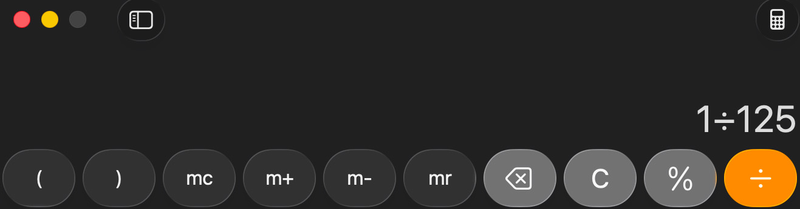
Multiply by 2Stops. Use the number of stops in your filter, for example 10 stops. Keep typing 1 ÷ 125 × 210: press the xy key (red arrow), then type 10. The second red arrow points at the answer, which is in seconds.
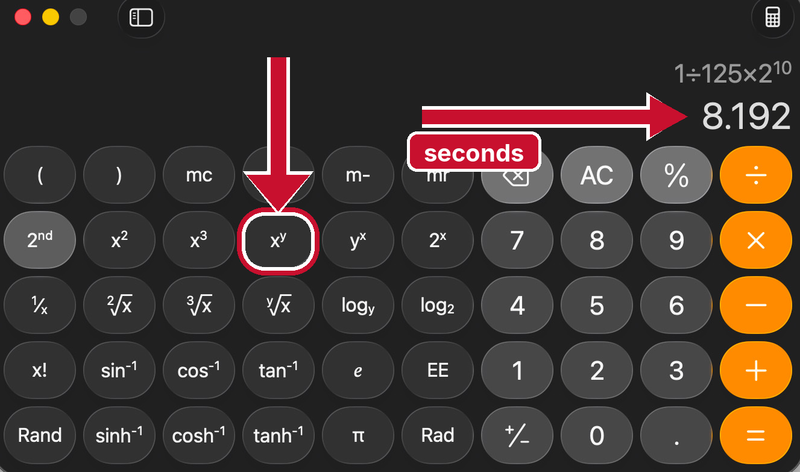
Set it manually. The answer is your new shutter time, about 8 seconds. Use Bulb past your camera’s longest preset.
| Filter | Stops | Light cut | 1/125 s becomes |
|---|---|---|---|
| ND8 (0.9) | 3 | 8× | about 1/15 s |
| ND64 (1.8) | 6 | 64× | about 1/2 s |
| ND1000 (3.0) | 10 | ~1,000× | about 8 s |
Working backwards: a 2-minute exposure
Start from the time you want and find out how much filter you need. For example, say the scene meters 1/125 s and you want 2 minutes.
Decide the time you want. 2 minutes is 120 s.
Take your normal exposure reading. Say it reads 1/125 s, which is 0.008 s.
Divide. 120 ÷ 0.008 = 15,000. Typing 120 × 125 gives the same answer.
Turn that into stops. 10 stops is about ×1,000, and 15,000 ÷ 1,000 = 15, which is about 4 more stops (24 = 16). In total you need about 14 stops.
Subtract your filter. A 10-stop ND leaves 4 stops to find. Close the aperture 4 stops (f/8 to f/32), or stack a 4-stop ND (ND16).
Set it manually. 120 seconds, using Bulb.
Quick version with one 10-stop filter: unfiltered time = 120 ÷ 210 ≈ 0.117 s, about 1/8 s. Set aperture and ISO until the meter reads 1/8 s without the filter, then fit the ND and set 120 seconds.
Step by step
- Compose and focus first, with no filter on. Then switch to manual focus so the camera doesn’t hunt.
- Set base ISO and an aperture around f/8–f/11 — the sharp, forgiving middle of most lenses.
- Meter the scene and note the shutter speed the camera suggests. Say it’s 1/125 s.
- Attach the ND filter.
- Do the math. 1/125 s through a 10-stop filter is about 8 seconds. Set it manually (use Bulb past your camera’s longest preset).
- Release with the remote or timer, check the histogram, and adjust one stop at a time.
How long for what
| Subject | Try | What you get |
|---|---|---|
| Moving water | ½ to 4 s | Soft flow that keeps some texture |
| Moving water | 30 s and up | Glassy, misty surface |
| Clouds | 1 to 3 minutes | Streaks; length depends on wind |
| Crowds and traffic | 5 to 30 s | Moving people vanish, still ones stay |
When it goes wrong
- Soft frames: wind on the tripod. Hang your bag from the centre column, and turn lens stabilisation off on a tripod.
- Colour cast: cheap ND filters tint warm or cool. Shoot RAW, set white balance in editing, and buy a neutral filter once.
- Specks and noise in the dark areas: try your camera’s long-exposure noise reduction, which takes a second “dark” frame to subtract.